Airalo eSIM Review for Your iPhone: Travel Smart
Spending much of my year working remotely overseas, reliable cellular service with mobile hotspot capability is essential. For years, I used local SIM cards that were affordable and ready to go. However, with Apple removing the SIM tray in newer iPhone models, I faced a dilemma. This was particularly challenging in Southeast Asia, where Wi-Fi often struggles with speed for video calls. I needed a dependable cellular connection.
Recently, I explored Airalo’s regional and country-specific eSIMs and was pleasantly surprised. Airalo stands out as a top international eSIM option for iPhones. While I discuss the benefits and drawbacks of eSIMs in another article, this is my focused review of Airalo eSIM during my Asia travels.
What is an eSIM card?
An eSIM is a digital version of a traditional SIM card that links your phone to a cellular network. It eliminates the need for a physical card and the hassle of using a tool to access the SIM tray. Plus, it simplifies the process of deactivating your service if your device is lost or stolen.
Types of eSIMs Available from Airalo
Airalo offers local (country-specific), regional, and global eSIMs. Generally, country-specific eSIMs are more affordable than regional or global options, and all these are cheaper than the $10/day international fees from U.S. carriers. Most eSIMs provide data only, so for calls, consider using Google Voice. More on that can be found in my article on travel and two-step verification. (If you choose Airalo, apply promo code NEWTOAIRALO15 for 15% off your first order!)
Existing users can save 10% with AIRALOESIM10.
Review of Airalo eSIMs for Travel in Asia
Below are insights from my experience with Airalo eSIMs across different Asian countries.
Experience in Japan, Thailand, Indonesia, and Malaysia
I hesitantly upgraded to an iPhone 15 Pro last year but kept my older iPhone 13 Pro for backup due to SIM card compatibility. Airalo previously worked well on my iPhone 13 Pro, though I had some initial setup issues that required assistance from Verizon. The new iPhone 15 Pro connected without any glitches.
eSIMs offer a set data allowance for a designated period, which only begins once activated. I prefer purchasing in advance to ensure connectivity upon landing, especially if Wi-Fi is unavailable in my arrival area or if I need to switch to another eSIM if one expires.
In August 2024, I was on a work trip through Southeast Asia (Thailand, Indonesia, Malaysia, and Singapore) and opted for an Airalo regional eSIM for Asia with 10GB of data valid for 30 days at $37. Country-specific eSIMs offer better value; for instance, my 30-day Japan eSIM was only $24.15 for 20GB.
After leaving Singapore, I flew to Japan for an extended stay, using my regional Asia eSIM until I switched to the Japan-specific eSIM. While traveling around Japan, I planned a brief stop in Busan, Korea, so I purchased a 5GB regional Asia eSIM for $18.55 valid for 30 days. They also have budget-friendly 7-day plans, but I prefer the 30-day option for maximum data.
Japan-only eSIMiPhones support dual eSIM activation. I pre-installed all the eSIMs but activated them as needed. I enjoyed 5G speeds in most areas with no service disruptions, even in rural locations. The personal hotspot function performed flawlessly. (For data management, I disabled cellular data for certain apps to conserve usage.)
Cambodia, Laos, and Vietnam eSIM Experiences
In early 2025, I visited Laos, Cambodia, and Vietnam using country-specific eSIMs, all of which are also supported by Airalo’s regional Asia eSIM plans. Notably, Airalo is the only eSIM provider with coverage in Laos, based on my findings. You can purchase a Laos-only eSIM for $9.50 for 1GB, though it's included in the regional Asia eSIM for better value.
In Cambodia, Airalo collaborates with the Metfone network, offering superior coverage in rural regions compared to Smart. It even enabled voice calls on the remote island of Koh Rong Sanloem, a spot known for poor cellular reception. I easily connected my computer to the hotspot when Wi-Fi was slow. (I utilized the Cambodia eSIM for 5GB over 30 days at $13 USD.)
In Vietnam, Airalo is preferred as it partners with Viettel, the fastest network in the country. I’ve tried other services, which only provided LTE, even in major cities like Hanoi and Ho Chi Minh. This network is the best option for video calls or work-related tasks. (For my brief two-night stay, I opted for the 1GB for 7-day plan at $4.50 USD.)
The Airalo app allows you to track data usage and eSIM expiry dates easily. You can also set up auto-renewal. Notifications alert you when data runs low or nearing expiration.
Overall, Airalo is efficient and convenient. I recommend downloading eSIMs before your trip for immediate activation upon arrival. It’s typically more economical than international service charges from U.S. carriers, especially for short trips. For me, it’s the ideal solution when I’m not staying long and can’t purchase an eSIM locally. I also appreciate their cashback loyalty program. Remember, country-specific eSIMs are more economical than regional options. (Use promo code NEWTOAIRALO15 for 15% off your first purchase or save 10% with AIRALOESIM10 for returning users.)
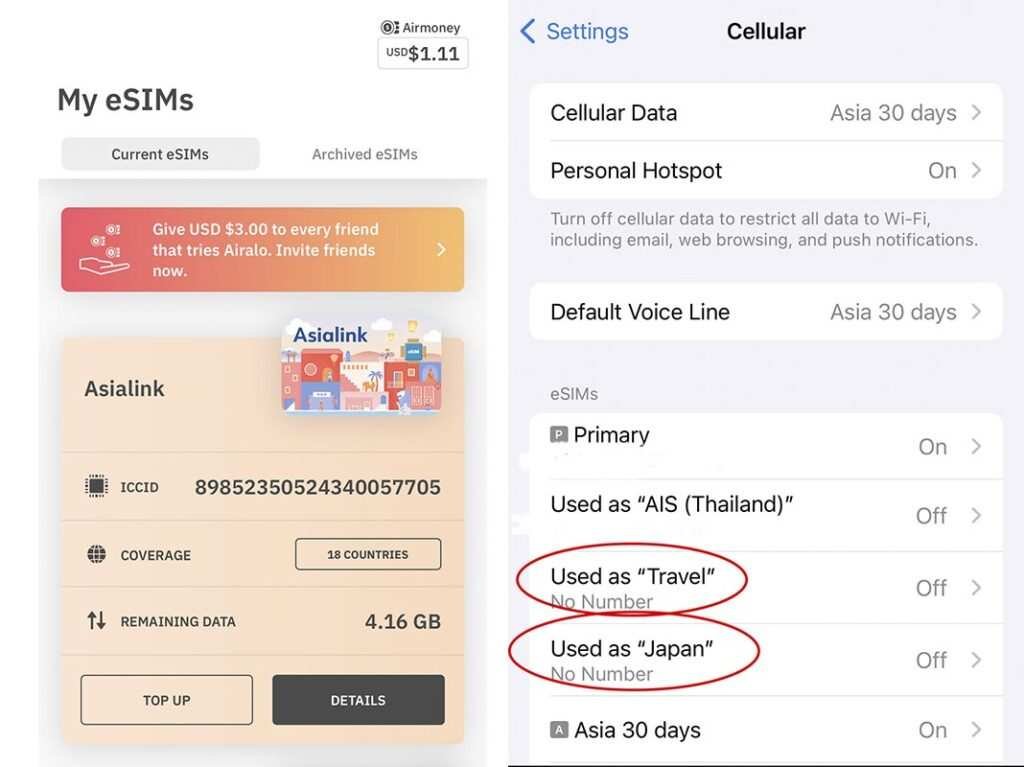 Left: The Airalo app simplifies monitoring your eSIM data balance. Right: When buying multiple eSIMs, label them for easy identification and activate only the ones you need. (Manage under Setting > Cellular on the iPhone.)
Understanding Airalo’s Loyalty Program
With every new eSIM purchase, Airalo rewards you with cashback through their Airmoney Rewards Program, which can be applied to future purchases.
The reward tiers are as follows:
- Traveler: New users earn 5% Airmoney Rewards.
- Silver Traveler: After spending $20 USD, the reward boosts to 6%.
- Gold Traveler: After spending $70 USD, the reward increases to 7%.
- Platinum Traveler: After spending $200 USD, the reward reaches 10%.
Note: Rewards cannot be redeemed alongside promo codes; only one option can be used. I usually compare which is more beneficial—redeeming rewards or using the AIRALOESIM10 code for 10% off.
Installing Airalo on Your Phone
Installation is straightforward—just follow the Airalo app's on-screen instructions.
Access My eSIMS in the app, select the Details button for your desired eSIM, click “View Instructions,” tap “Direct,” and then “Install eSIM” to follow the setup guide. For detailed instructions with visuals, check this page.
After activation, you can name your eSIM as you wish. If using multiple eSIMs, labeling them simplifies management. Ensure inactive eSIMs are turned off in your cellular settings.
How to Confirm eSIM Compatibility
Airalo confirms compatibility during the purchase, preventing unnecessary expenses. I encountered setup issues with my previous iPhone 13 Pro, requiring assistance from Verizon. Thankfully, once resolved, my iPhone 15 Pro experienced no problems.
For additional information on eSIM advantages and disadvantages, refer to this article.

Suggestions for Enhancing Airalo
Having used Airalo across four continents, these two aspects have been somewhat frustrating. While I've encountered complaints about network connections, my experiences have generally been positive, particularly with their partnerships with leading networks like Viettel in Vietnam.
1. Streamlined eSIM Installation & Management
Each Airalo eSIM requires separate installation, which involves labeling and deleting later. As a frequent eSIM user, I label based on location or plan (like “Thailand” or “Europe”). It would be more efficient to install a single eSIM profile and add various plans within it, something I’ve seen with other brands.
2. Improved Support Services
To avoid running out of data in remote locations, I typically top up eSIMs ahead of time. If unused, I request a refund, which Airalo Support has handled promptly without hassle.
When using the app's chat feature, the AI chatbot often loops me into a sign-in request, even when I’m logged in, leading me to seek human assistance. While the response time for human support is quick, it would be great if the chatbot could efficiently resolve basic inquiries to streamline the experience. Additionally, I sometimes need to verify via email for refund processing, which could also be simplified within the app.
Resolving Common Airalo Issues on Your iPhone
1. Install Your eSIM Prior to Travel.
I always install my eSIM before boarding to ensure immediate access upon arrival. Airalo clearly indicates compatibility during the purchase process. When installing, label the eSIM for easy identification.
2. Ensure the eSIM is Activated for Cellular Data.
Go to Settings, select Cellular Data, and ensure the correct eSIM is active under the Cellular Data settings.
3. Enable Data Roaming.
Some eSIMs require data roaming to be enabled, as mentioned in the activation instructions and the How to Connect section in the Airalo app.
4. Toggle Airplane Mode.
Switching Airplane Mode off and on often resolves connection issues with the eSIM. Restarting the phone can also help.
5. Troubleshoot Network Settings.
If your eSIM is activated but not functioning, consider these solutions:
- Manually select the network. eSIMs may connect to multiple networks. Ensure it connects to the network listed in your eSIM profile. Disable automatic selection if necessary.
- Disable limit IP address tracking.
- Adjust Network Mode. In the eSIM settings, navigate to Voice & Data and select the appropriate setting based on eSIM capabilities. If it only supports 4G, change the setting accordingly.
- Check APN settings. While the Access Point Name usually configures automatically, some eSIMs require a specific APN listed in the installation instructions.
- Turn off other eSIMs and restart your device. If the problem persists, reach out via WhatsApp or connect with Airalo’s 24/7 multilingual support.